Weather Now Launcher - Radar
- 4.0
- Rating
- 5.00M
- Installs
- Free
- Price
 Analysis by App-foxy
I approached Weather Now Launcher - Radar as a practical weather tool rather than another app I would open only to read a temperature. Its main appeal is the live NOAA-based weather view, especially when I need to understand whether rain, wind, lightning, or a developing storm is actually moving toward me. That distinction matters: a simple forecast can tell me that rain is possible, while a radar-focused view helps me decide whether to leave now, wait a little, or change plans altogether.
Developed by Homescreen Apps, this free Android weather app is aimed at people who want local conditions presented in a more immediate way. It is available for Everyone and requires Android 9 or later. The current release is version 1.1.92, and the app has reached over 5 million installs with an average score of 4.3 from around 40 thousand ratings. Those figures suggest that it has found a broad audience, but my experience is that its value depends less on wanting a complete weather dashboard and more on caring about what is happening outside right now.
Why the live radar view matters more than another forecast
The capability I kept returning to was the live weather picture built around NOAA information. Radar is useful because it gives weather a sense of direction and scale. Instead of treating “rain” as a yes-or-no label, I can look for the area of precipitation, judge how close it appears, and see whether the situation seems to be building or passing. For everyday decisions, that is often more helpful than a long list of hourly temperatures.
You May Also Like

 Blood Strike: 2.5 Anniversary
Blood Strike’s Loadouts Turn Every Drop Into a Tactical Gamble
A close look at Blood Strike’s custom loadouts: how fast access to signature weapons reshapes its battle royale rhythm, rewards preparation, and narrows the gap between fights.

 Pandora - Music & Podcasts
Pandora’s Music Is Easy to Start, but Harder to Recover
Pandora’s strength is its low-effort path from a seed to a station. Its weak spot is how much confidence it asks you to place in connection, setup, and quiet recovery.

 8 Ball Pool
 Is Built on Rivalries, Rematches, and Routine
A close look at the rivalries, rematches, shared routines, and unanswered safety questions that turn a quick pool match into a persistent mobile community.

 Samsung Music
’s Quiet Strength Is Playing What You Already Own
Its reach comes less from spectacle than from dependable access to a personal library. That simplicity is both the app’s strongest retention engine and its ceiling.

 AccuWeather: Weather Radar
AccuWeather Review: A Quick, Clear Forecast for Everyday Decisions
For everyday plans, the best forecast is the one you can understand quickly. AccuWeather makes rain timing, radar, and local conditions easy to act on, with a few trade-offs.

 Hill Climb Racing
Why Hill Climb Racing Still Turns Crashes Into One More Run
A tiny car, a bumpy hill and one more upgrade: Hill Climb Racing keeps resurfacing because its simple chaos makes every near-miss feel personal.
More From Our News Desk



I found this particularly useful for short decisions: walking to a shop, taking a dog outside, cycling across town, or deciding whether outdoor work can continue. A forecast may still be necessary for planning several hours ahead, but the radar view answers a different question: what is most likely to affect me soon? That is the reason I would install this app alongside, rather than instead of, a traditional forecast service.
The focus also extends beyond rain. Storm activity, wind, and lightning are important when conditions change quickly. A dark cloud on the horizon can be harmless, but a storm system with lightning deserves a different response. Having those weather elements in one place makes the app more useful for people who spend time outdoors or live in an area where conditions can shift rapidly.
There is a subtle benefit here for anyone who dislikes false precision. Weather apps often present exact-looking values that encourage me to believe the forecast is more certain than it really is. A radar image feels more observational: I can see the current pattern and make my own judgement. It does not eliminate uncertainty, but it helps me understand why the forecast may change during the day.
Reading the map without overtrusting it
My first practical tip is to use the radar as a decision aid, not as a guarantee. A precipitation band can weaken, split, or move differently from what I expect. The closer the weather is to my location, the more useful the current picture becomes; for plans later in the day, I would still check the broader forecast. This simple habit prevents the common mistake of seeing a clear patch on a map and assuming the entire afternoon is safe.
I also found it helpful to check the app immediately before leaving rather than relying on a screenshot or an earlier glance. Live weather information has value because conditions move. If I am heading out for a run, I would look at the radar, note the direction of the nearest rain or storm area, and then check again before committing to a longer route. That workflow is more reliable than opening the app once in the morning and treating it as a fixed plan.
For wind and lightning, context matters even more. A light shower may only require a jacket, while lightning changes the safety decision entirely. The app can help me notice that difference, but it cannot replace common sense or local safety advice. I would not use any radar application as permission to remain outdoors during dangerous weather.
How it fits into an ordinary day
Imagine I have arranged to walk across town after work. The sky looks bright when I leave the office, but rain is forecast later. I open Weather Now Launcher - Radar and look at the current local pattern instead of guessing from the clouds. If the nearest rain area is moving toward my route, I can take an umbrella, shorten the walk, or wait. If it is moving away, I may decide to go ahead while keeping an eye on the situation.
That scenario shows the app at its best: it reduces a vague question to a more practical one. I am not asking it to predict the entire evening perfectly. I am asking whether the next part of my journey is likely to be affected. The answer may still be imperfect, but it is more actionable than a generic weather icon.
For parents, the same approach can help with school pickup or playground plans. For commuters, it can influence whether to walk, cycle, or use another option. For gardeners and people doing outdoor repairs, radar can help identify a short workable window. These are modest decisions, but they happen repeatedly, which is where a focused weather tool earns its place.
I would also use it before outdoor photography, a local sports practice, or a weekend drive. In each case, the benefit is not that the app makes the decision for me. It gives me a visual basis for deciding how flexible my plan needs to be. That is more valuable than simply showing a temperature that I already know how to find elsewhere.
A workflow that saves time
My preferred routine is simple. I first check the local radar view, then consider the direction and apparent density of the weather near my area. After that, I look at the wider forecast before making a longer commitment. If the two views seem inconsistent, I treat that as a reason to stay flexible rather than choosing whichever one looks more convenient.
This is one of the app’s less obvious strengths: it encourages a better relationship with weather information. Instead of repeatedly refreshing a forecast and hoping for certainty, I can use the live view to understand the immediate situation and then combine it with my own knowledge of the neighborhood. Hills, buildings, coastlines, and local exposure can all affect how conditions feel on the ground, so personal judgement still matters.
Another useful habit is checking conditions at the destination, not only at home. A short trip can cross a surprisingly different weather area. If I am travelling across a city, the weather near my starting point may not represent what I will find at the other end. A local radar tool is most helpful when I remember that “local” should mean the place I am actually going.
Where the app is strongest
The best scenario for this app is someone who needs near-term awareness rather than elaborate long-range planning. I would recommend it to a runner deciding whether to start now, a cyclist watching storm movement, a dog owner timing a walk, or anyone who wants a quick visual check before leaving home. It is also a sensible option for users who find conventional weather screens too passive and want to see the weather system itself.
It is especially convincing when conditions are unsettled. On a stable sunny day, the radar may not add much to a normal forecast. During a day of scattered showers, gusty wind, or storm activity, the visual information becomes much more useful. That means I would not judge the app by how exciting it feels on a calm day; its value appears when the forecast is difficult to interpret from a single icon.
The free price lowers the barrier to trying it, which suits occasional users. I do not need to commit to a subscription simply to see whether a radar-centered approach fits my routine. The Everyone rating also makes it suitable as a general household weather tool, although younger users should still be taught that weather maps are guidance and not a replacement for adult safety decisions.
Its adoption is another practical reassurance. With more than 5 million installs, it is not an obscure experiment that only works for a narrow group. The 4.3 average from roughly 40 thousand ratings is solid rather than flawless, which matches my impression: the central idea is useful, but people who expect a fully customized weather station may want more than this focused experience provides.
What it does not replace
I would not choose this as my only weather source for multi-day travel, detailed agricultural planning, or decisions that depend on highly specialized local information. A radar view is excellent for seeing what is happening nearby, but it is not the same as a complete planning system. If I need a detailed schedule for the whole week, I would compare it with a conventional forecast app.
It is also not the ideal choice for someone who wants the calmest possible glance at the weather. Some people only need the current temperature, a daily high and low, and a simple rain chance. For them, a standard phone weather widget may be faster. Weather Now Launcher - Radar earns its space when the map and live conditions are the point, not when they are extra decoration.
There is a learning curve, even if it is small. New users may look at a colored weather pattern and immediately assume it predicts exactly what will happen at their front door. I had to remind myself to interpret movement, distance, and intensity together. The app becomes more useful after that adjustment, but anyone wanting a single definitive sentence may find the visual approach less comfortable.
Another trade-off is attention. A radar screen invites repeated checking, especially when a storm is nearby. That can be useful before a journey, but unnecessary refreshing will not make the forecast more certain. I would use it at sensible decision points: before leaving, before starting an outdoor activity, and when the weather visibly changes.
How it compares with ordinary weather alternatives
Compared with a built-in phone weather widget, this app feels more investigative. The widget wins for speed because it can show a basic condition without requiring much thought. Weather Now Launcher - Radar wins when I need to understand movement and immediate risk. The choice is therefore not simply about which app has more information; it is about whether I need a snapshot or a visual explanation.
Compared with a general forecast app, the difference is emphasis. General services usually make hourly and daily planning easy, while this app puts the current local situation closer to the center of the experience. I would keep a general forecast tool for holidays and appointments, then use this one when rain or storms are the immediate concern.
Compared with dedicated storm-tracking tools, its appeal is accessibility. I do not have to treat every weather check like an emergency operation. The interface is suitable for ordinary decisions, while still giving me more context than a temperature card. Users who need advanced professional meteorological analysis may prefer a specialized service, but most people are not making aviation or emergency-management decisions every day.
The strongest setup for me is a two-step approach: use a normal forecast for the day ahead and Weather Now Launcher - Radar for the next few hours. That avoids asking one tool to do everything. It also makes the app’s limitation feel less like a defect and more like a clear boundary around what it does well.
Small habits that improve the experience
I recommend checking the map before choosing a route, not after leaving. If a storm line is approaching from one direction, a route that keeps me near shelter may be wiser than the shortest path. This is a practical advantage that does not appear in a basic weather summary: the information can change not only whether I go, but how I go.
For outdoor activities, I would build in a pause point. If I am planning a long walk, I can decide in advance that I will reassess at a café, transit stop, or other sheltered location. The app then becomes part of a safety plan rather than a last-second gamble. This is particularly sensible when wind or lightning is involved.
I would also avoid interpreting a quiet-looking map as proof that conditions are harmless. Wind can still make a route unpleasant, and isolated lightning or fast-forming storms deserve caution. The app is most effective when I combine its live view with what I can see and hear outside.
Who will get the most from it?
I think the best match is an Android user who regularly makes short outdoor decisions and wants more than a static forecast icon. Walkers, cyclists, runners, commuters, dog owners, gardeners, and families planning nearby activities can all benefit from the radar-first perspective. It is also a good fit for anyone who prefers visual information and wants to judge weather movement personally.
I would suggest skipping it if your only requirement is a tiny glance at today’s temperature, or if you need highly detailed long-range planning as the main purpose. In those cases, a conventional weather service may be clearer and quicker. I would also avoid relying on it alone for severe-weather safety decisions; use official alerts and local guidance when conditions become dangerous.
The developer, Homescreen Apps, has kept the app’s central value easy to understand: look at the current local weather and decide with better context. The free model makes experimentation straightforward, and the current version, 1.1.92, gives users a recent release to try on Android 9 and newer devices. I would still judge it by the radar experience rather than by the size of its feature list.
After using it, my recommendation is positive but specific. Weather Now Launcher - Radar is most useful when the question is “what is moving toward me now?” It will not replace every weather app, and it should not be treated as a promise of perfect timing. But for rain, wind, lightning, and storm awareness before a short trip or outdoor plan, it gives me information I can act on. If that is the kind of weather question you ask most often, this is a practical free app worth keeping installed.
FAQs for Weather Now Launcher - Radar
01What features does Weather Now Launcher - Radar offer?
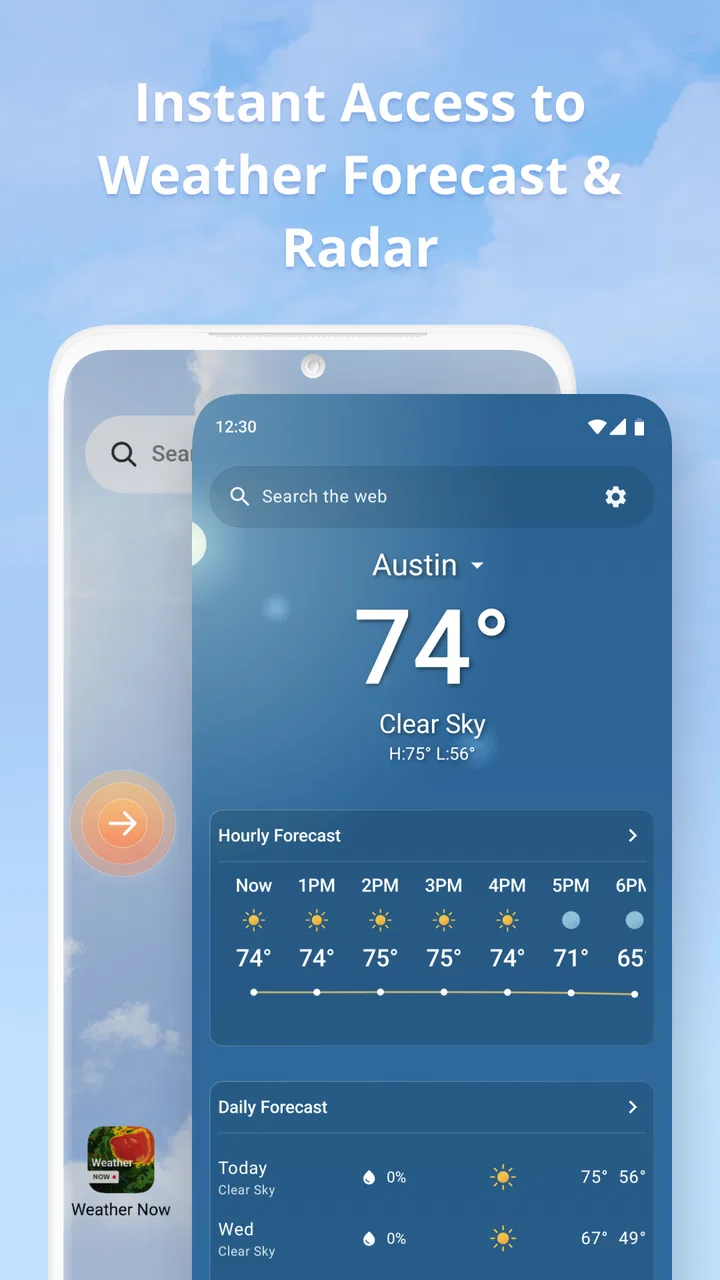
Weather Now Launcher - Radar provides real-time weather updates, a customizable widget for easy access on your home screen, and detailed radar imagery. You can track weather conditions such as temperature, humidity, wind speed, and precipitation forecasts. The app also offers severe weather alerts to keep you informed of any potential weather hazards.
02Is Weather Now Launcher - Radar free to use?
Yes, Weather Now Launcher - Radar is free to download and use. However, it may offer in-app purchases or a subscription for premium features, such as an ad-free experience or advanced radar options. These purchases are optional and are intended to enhance the user experience.
03How accurate is the weather information provided by Weather Now Launcher - Radar?
Weather Now Launcher - Radar utilizes data from reliable meteorological sources to provide accurate and up-to-date weather information. The app uses advanced algorithms to deliver precise forecasts and radar imagery. However, like any weather app, accuracy can vary based on location and other factors, so it’s always good to compare with other sources.
04Can I customize the appearance of Weather Now Launcher - Radar?
Yes, the app allows for extensive customization. You can choose from different widget styles, themes, and layouts to match your personal preferences. Additionally, you can arrange and prioritize the information displayed, ensuring that the most relevant weather details are easily accessible on your home screen.
05Does Weather Now Launcher - Radar require an internet connection?
Yes, an internet connection is necessary for Weather Now Launcher - Radar to fetch the latest weather data and radar updates. While some information might be cached for offline viewing, real-time updates and accurate forecasts require connectivity. It’s recommended to have a stable internet connection for the best experience.
Pros
- Intuitive interface with sleek design.
- Accurate real-time weather updates.
- Customizable widget options.
- Low battery consumption.
- Supports multiple locations.
Cons
- Contains ads that can be intrusive.
- Limited free features; premium needed.
- Occasional lag in app loading.
- No offline mode available.
- Requires constant internet connection.

Weather Now Launcher - Radar
Gallery